Documentation
Elements
- <a>
- <altRepresentation>
- <aside>
- <assessment>
- <author>
- <backcover>
- <blockquote>
- <body>
- <bodymatter>
- <caption>
- <code>
- <cover>
- <dd>
- <dl>
- <document>
- <dt>
- <em>
- <figure>
- <figureGroup>
- <frame>
- <frontcover>
- <frontmatter>
- <hd>
- <img>
- <indicators>
- <input>
- <jacketcopy>
- <legend>
- <li>
- <line>
- <linegroup>
- <list>
- <meta>
- <metadata>
- <note>
- <noteRef>
- <p>
- <pagebreak>
- <poem>
- <publication>
- <pullquote>
- <rearmatter>
- <section>
- <source>
- <span>
- <sub>
- <subtitle>
- <sup>
- <table>
- <tbody>
- <td>
- <tfoot>
- <th>
- <thead>
- <title>
- <tr>
Grandes Lignes
6.1 FLEX
Book structure
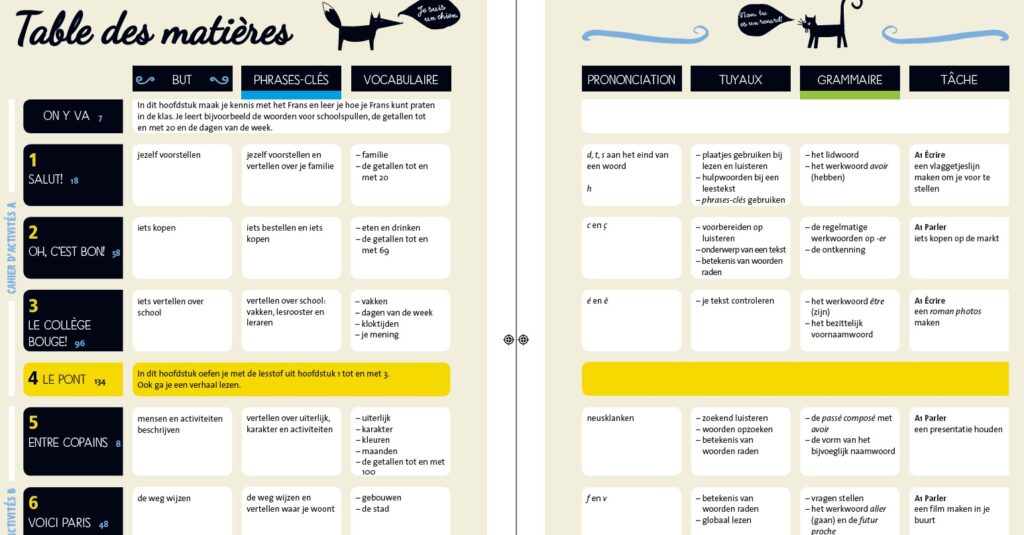
See Sectioning and Tables of contents for more information, especially the section on special or graphical tables of contents.
Chapters and subchapters
Chapter
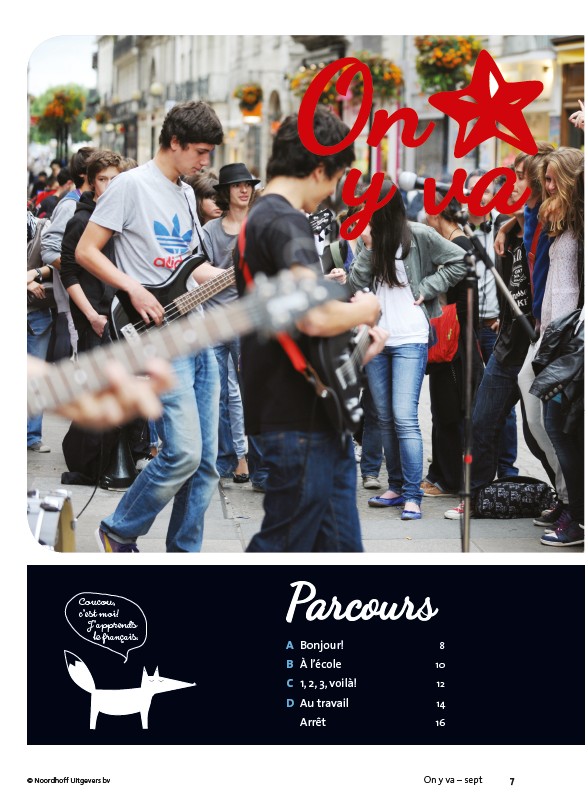
<section level="1" role="chapter">
  <hd level="1 number="1" label="chapter">On y va</hd>
  <p>Parcours</p>
  <list role="toc" listType="ordered" numberType="predefined">
    <li number="A">Bonjour! <a type="pageRef" href="#pb-8">8</a></li>
    <li number="B">À l'école <a type="pageRef" href="#pb-10">10</a><li>
    <li number="C">1, 2, 3, voilà! <a type="pageRef" href="#pb-12">12</a></li>
    <li number="D">Au travail <a type="pageRef" href="#pb-14">14</a></li>
    <li>Arrêt <a type="pageRef" href="#pb-16">16</a></li>
  </list>
Subchapter
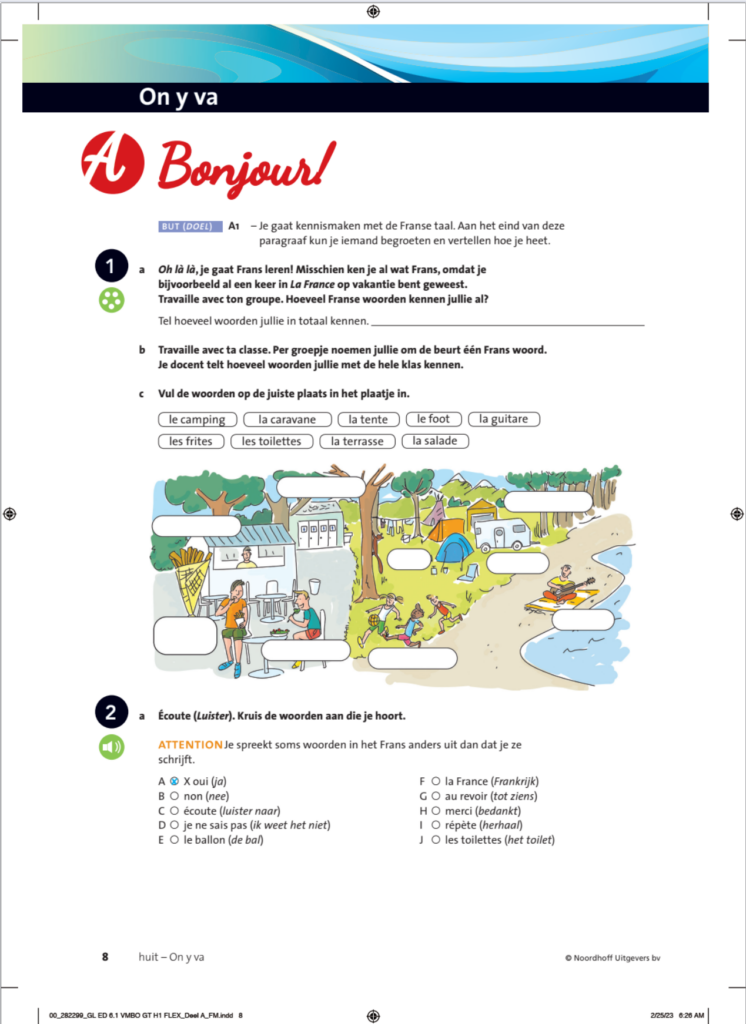
<section level="2" role="subchapter">
  <hd level="2 label="subchapter">A Bonjour!</hd>
  <p><em backgroundColor="lightPurple">BUT (<span fontStyles="italic">DOEL</span>) </em> A1 - ...</p>
  <assessment assessmentType="practice">
   <title number="1" label="assessment">1</title>
   <p><img alt="groupe" role="informative" src="/img/groupejpg" type="pictogram"/>a Oh là là, je gaat Frans leren!...
Chapter
Preliminary note on the chapter structure:
- In each chapter (‘chapitre’) the entries INTRODUCTION, ARRÊT and TACHE mentioned in the toc of that chapter (‘Parcours’) correspond with sections on level2 with role ‘subchapter’.
- PARTIE 1 and PARTIE 2 are section level2, but in the print there is no page reference, so it won’t be included in the toc. just a <p> will be used.
- The remaining entries ( A Écouter, B Lire etc) correspond sections on level3 also with role ‘subchapter
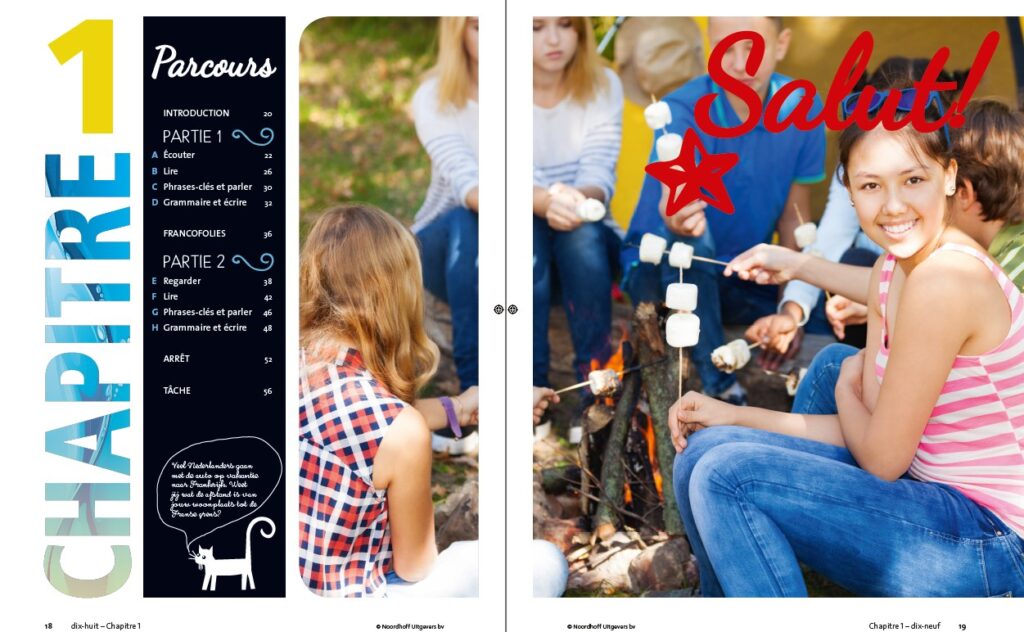
<section level="1" role="chapter">
<hd level="1 number="1">Chapitre 1</hd>
<p>Parcours</p>
<list role="toc" listType="ordered" numberType="predefined">
   <li>INTRODUCTION <a type="pageRef" href="#pb-20">20</a></li>
</list>
<p>PARTIE 1</p>
<list role="toc" listType="ordered" numberType="predefined">
   <li number="A">Écouter <a type="pageRef" href="#pb-22">22</a><li>
   <li number="B">Lire <a type="pageRef" href="#pb-26">26</a></li>
   <li number="C">Phrases-clès et parler <a type="pageRef" href="#pb-30">30</a></li>
   <li number="D">Grammaire er écrire <a type="pageRef" href="#pb-32">32</a></li>
   <li>FRANCOFILIES <a type="pageRef" href="#pb-36">36</a></li>
</list>
<p>PARTIE 2</p>
<list role="toc" listType="ordered" numberType="predefined">
   <li number="E">Regarder<a type="pageRef" href="#pb-38">38</a><li>
   <li number="F">Lire <a type="pageRef" href="#pb-42">42</a></li>
   <li number="G">Phrases-clès et parler <a type="pageRef" href="#pb-46">46</a></li>
   <li number="H">Grammaire er écrire <a type="pageRef" href="#pb-48">48</a></li>
   <li>ARRÊT <a type="pageRef" href="#pb-52">52</a></li>
   <li>TÂCHE <a type="pageRef" href="#pb-56">56</a></li>
</list>
...
<hd>Salut!</hd>
Subchapter
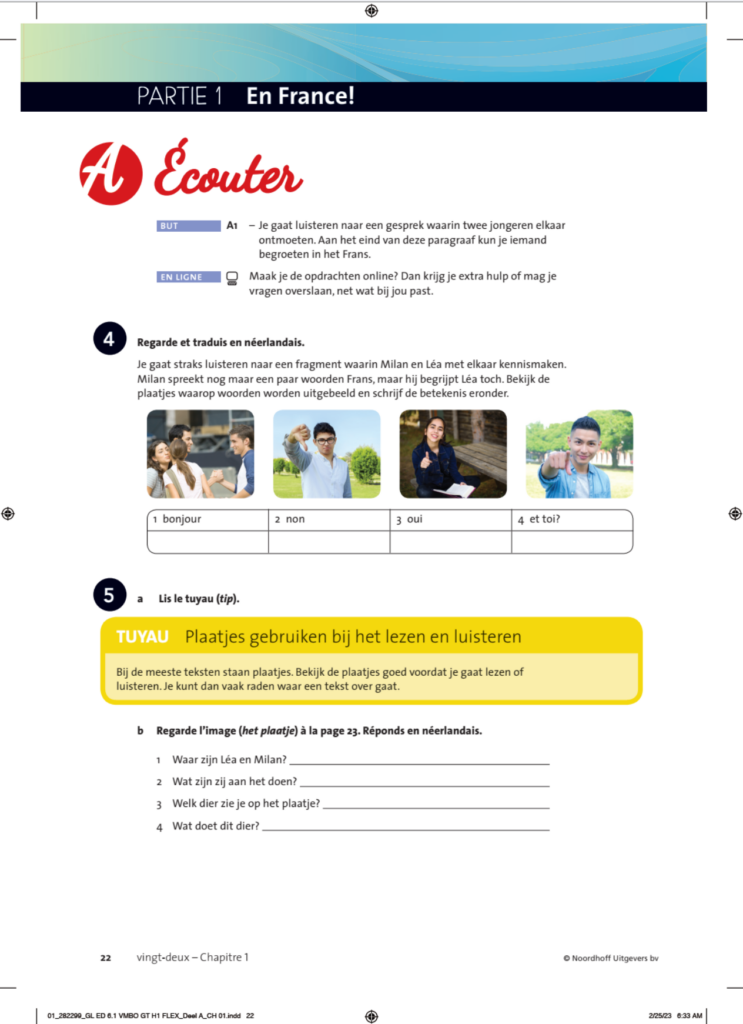
<section level="2" role="subchapter">
   <hd level="2 >PARTIE 1 En France!</hd>
      <section level="3" role="subchapter">
        <hd level="3 >A Écouter</hd>
         ....
Pictograms and colors
See Global attributes and Pictograms for detailed instructions.
| Pictogram | value alt attribute |
 | lire |
 | écouter |
 | regarder |
 | parler |
 | voisin |
 | groupe |
 | écrire |
 | en ligne |
 | makkelijk |
 | moeilijk |
Use <em backgroundColor="lightPurple"> for the following instances:
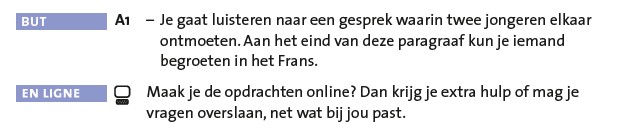
<p><em backgroundColor="lightPurple">but</em> A1</p>
<list listType="unordered" bulletType="dash">
  <li>Je gaat luisteren naar een gesprek waarin ...</li>
</list>
<p><em backgroundColor="lightPurple">en ligne</em> <img alt="en ligne" role="informative" src="/img/000_en-ligne.jpg" type="pictogram"/>Maak je de opdrachten online? Dan krijg je ...</p>
Use <em foregroundColor=”orange”> for the following instances:

<p><em foregroundColor="Orange">ATTENTION</em> In deze opdracht oefen je alvast met een paar zinnen uit de...</p>Tables
Process the following as a table with indicators in the first column. See <table> and <indicators> for detailed intstructions
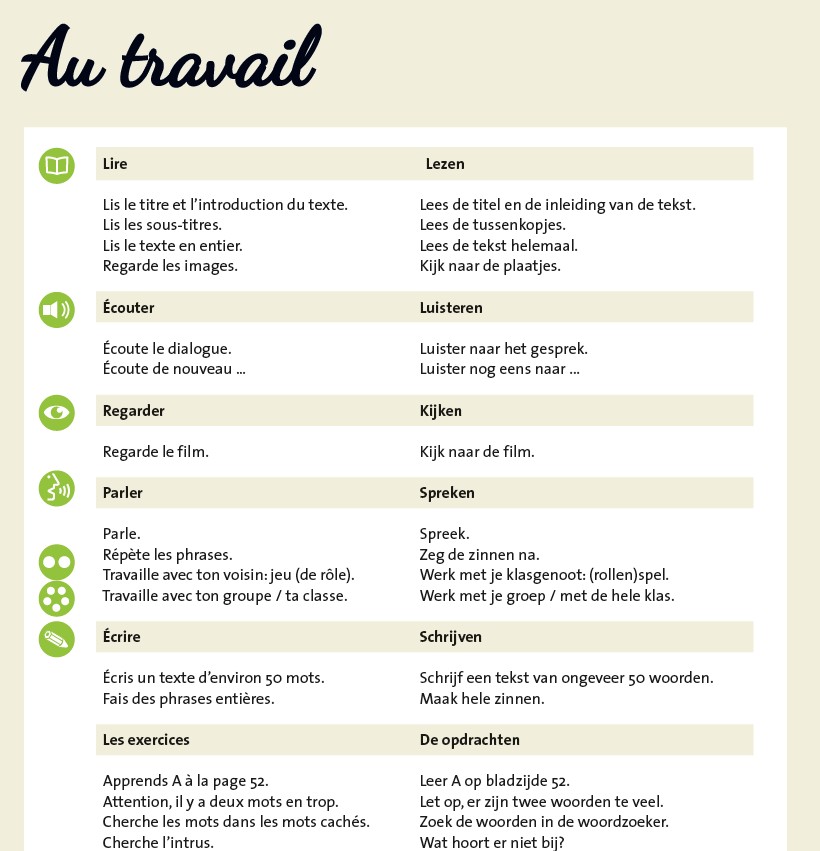
<table>
  <title>Au travail</title>
    <tr>
      <td><img src="/img/000000_lire.jpg" alt="lire" role="informative" type="pictogram"/></td>
      <td fontStyles="bold">Lire</td>
      <td fontStyles="bold">Lezen</td>
    </tr>
    <tr>
      <td/>
      <td>Lis le titre et l’introduction du texte.</td>
      <td>Lees de titel en de inleiding van de tekst.</td
    <tr>
    <tr>
       ...
    </tr>
    <tr>
      <td><img src="/img/000000_ecouter.jpg" alt="ecouter" role="informative" type="pictogram"/></td>
      <td fontStyles="bold">Écouter</td>
      <td fontStyles="bold">Luisteren</td>
    </tr>
    <tr>
      ...

</table>
Process the following example as 3 seperate tables. The bullets should not be included in the code.
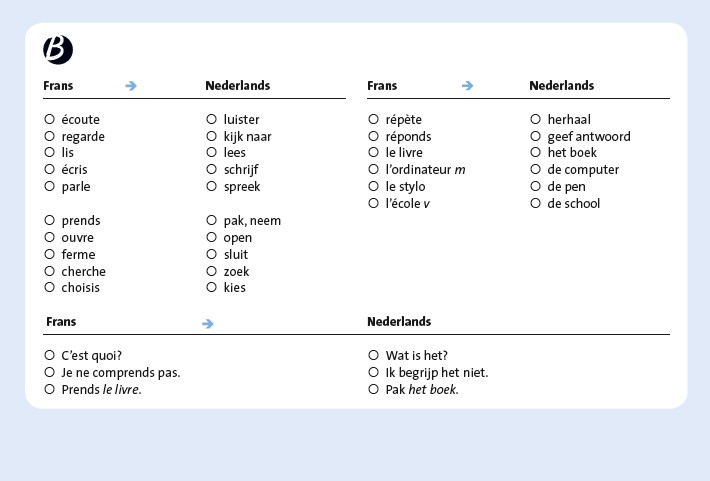
<table>
  <thead>
    <tr>
      <th>Frans</th>
      <th>Nederlands</th>
    </tr>
  </thead>
  <tbody>
    <tr>
      <td>écoute</td>
      <td>luister</td>
    </tr>
    <tr>
      <td>regarde</td>
      <td>kijk naar</td>
    </tr>
    <tr>
      <td>lis</td>
      <td>lees</td>
    </tr>
    <tr>
      <td>écris</td>
      <td>schrijf</td>
    </tr>
    <tr>
      <td>parle</td>
      <td>spreek</td>
    </tr>
    <tr>
      <td>prends</td>
      <td>pak, neem</td>
    </tr>
    <tr>
      <td>ouvre</td>
      <td>open</td>
    </tr>
    <tr>
      <td>ferme</td>
      <td>sluit</td>
    </tr>
    <tr>
      <td>cherche</td>
      <td>zoek</td>
    </tr>
    <tr>
      <td>choisis</td>
      <td>kies</td>
    </tr>
  </tbody>
</table>

<table>
  <thead>
    <tr>
      <th>Frans</th>
      <th>Nederlands</th>
    </tr>
  </thead>
  <tbody>
    <tr>
      <td>répète</td>
      <td>herhaal</td>
    </tr>
    <tr>
      <td>réponds</td>
      <td>geef antwoord</td>
    </tr>
    <tr>
      <td>le livre</td>
      <td>het boek</td>
    </tr>
    <tr>
      <td>l’ordinateur <em type="italic">m</em></td>
      <td>de computer</td>
    </tr>
    <tr>
      <td>le stylo</td>
      <td>de pen</td>
    </tr>
    <tr>
      <td>l’école <em type="italic">v</em></td>
      <td>de school</td>
    </tr>
  </tbody>
</table>

<table>
  <thead>
    <tr>
      <th>Frans</th>
      <th>Nederlands</th>
    </tr>
  </thead>
  <tbody>
    <tr>
      <td>C’est quoi?</td>
      <td>Wat is het?</td>
    </tr>
    <tr>
      <td>Je ne comprends pas.</td>
      <td>Ik begrijp het niet.</td>
    </tr>
    <tr>
      <td>Prends <em type="italic">le livre</em>.</td>
      <td>Pak <em type="italic">het boek</em>.</td>
    </tr>
  </tbody>
</table>
Assessments
See Assessments and <assessment> for more information on how to markup. Below are a few examples.
Assessment with wordBank
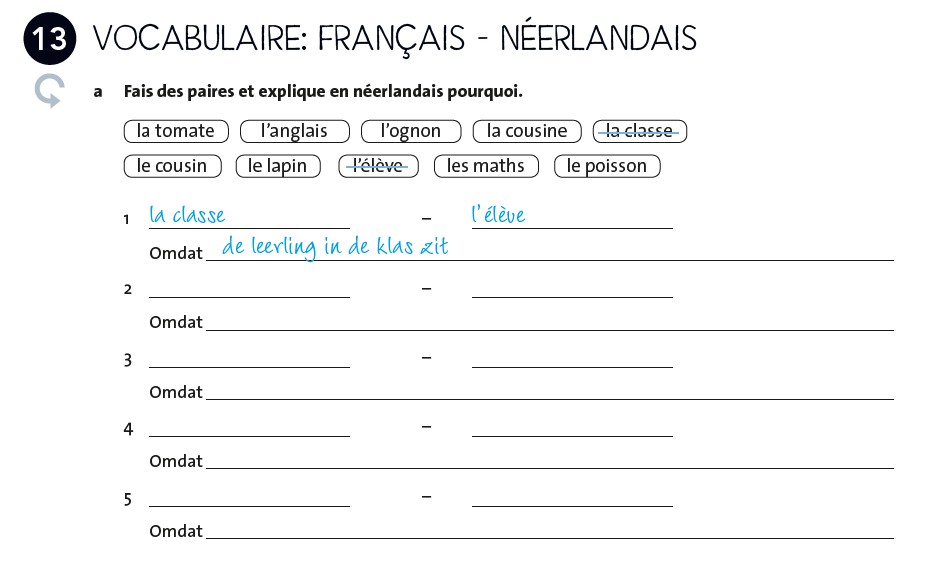
<assessment assessmentType="practice">
  <title number="13" label="assessment">13 vocabulaire: français - néerlandais</title>
  <indicators><img alt="makkelijk" role="informative" src="/img/000000_makkelijk.jpg" type="pictogram"/></indicators>
<p><em type="bold">a</em> Fais des paires et explique en néerlandais pourquoi.
<list listType="unordered" bulletType="none" role="wordBank">
   <li>la tomate</li>
   <li>l'anglais</li>
   <li>l'ognon</li>
   <li>la cousine</li>
   <li fontStyles="strikeThrough">la classe</li>
   <li>le cousin</li>
   <li>le lapin</li>
   <li fontStyles="strikeThrough">l''elève</li>
   <li>les maths</li>
   <li>le poisson</li>
</list>
<p>1 <input type="text" prefilled="la classe" id="input-1"/> - <input type="text" prefilled="l'élève" id="input-2"/></p>
<p>Omdat <input type="text" prefilled="de leerling in de klas zit" id="input-3"/></p>
<p>2 <input type="text" id="input-4"/> - <input type="text" id="input-5"/></p>
<p>Omdat <input type="text" id="input-6"/></p>
...
</assessment>
Assesment in frame without a number in the title
Process an assessment without a number in its title but with a frame using the title as title of the assessment and place the rest within a <frame>-element
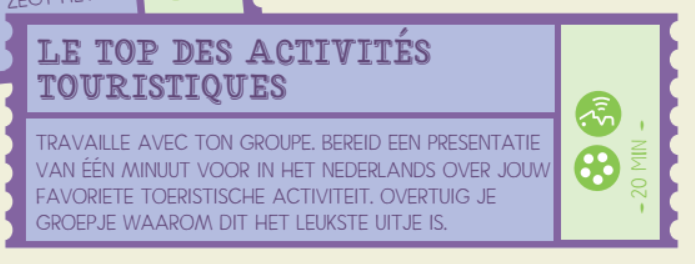
<assessment assessmentType="practice">
  <title label="assessment">Le top des activités touristiques</title>
  <frame>
     <indicators><img alt="parler" role="informative" src="/img/000000_parler.jpg" type="pictogram"/></indicators>
     <indicators><img alt="groupe" role="informative" src="/img/000000_groupe" type="pictogram"/></indicators>
     <p>20 min</p>
     <p>Travaille avec ton groupe. Bereid een presentatie van één minuut voor in het Nederlands over jouw favoriete toeristische activiteit. Overtuig je groepje waarom dit het leukste uitje is.</p>
   </frame>
</assesment>
Assesments with predominantly graphical content
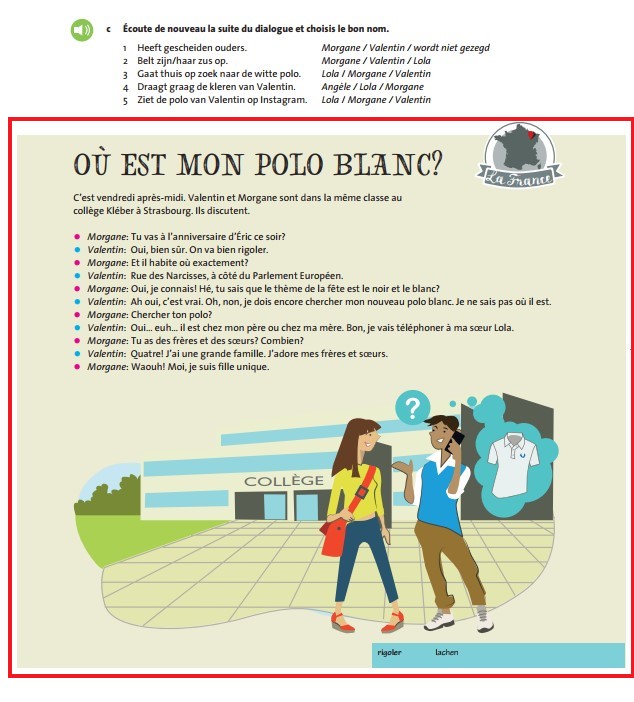
When an assesment consists of mainly graphical material, capture the picture and present it in a <figure>-element:
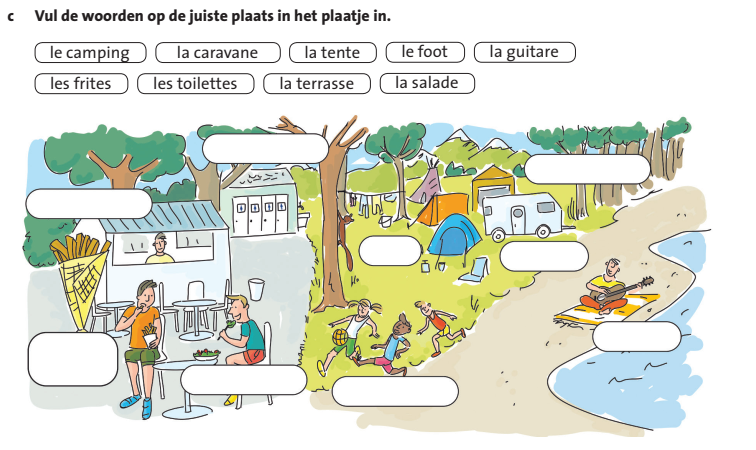
<p fontStyles="bold">c Vul de woorden op de juiste plaats in het plaatje in.</p>
<figure>
  <img alt="assesment graphic" role="informative" type="drawing" src="/img/name_of_picture.jpg"/>
</figure>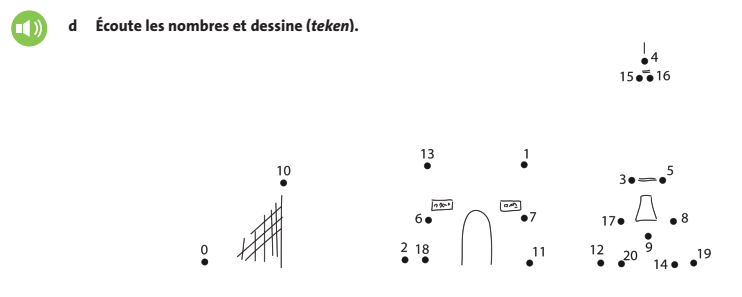
<indicators><img src="/img/00000000_ecouter.jpg" alt="écouter" role="informative" type="pictogram"/></indicators>
<p fontStyles="bold">d Écoute les nombres et dessine (teken).</p>
<figure>
  <img alt="assesment graphic" role="informative" type="drawing" src="/img/name_of_picture.jpg"/>
</figure>
Assessment with speech bubbles
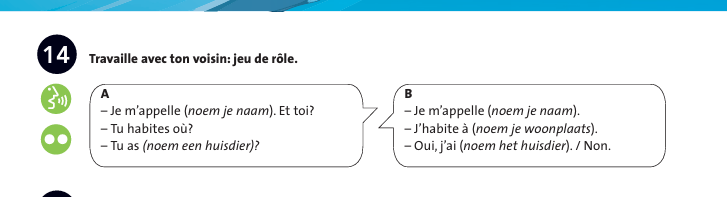
<assessment assessmentType="practice">
  <title number="14" label="assessment">14</title>

  <indicators>
    <img alt="parler" role="informative" src="/img/000000_picto-parler.jpg" type="pictogram"/>
    <img alt="voison" role="informative" src="/img/000000_picto-voison.jpg" type="pictogram"/>
  </indicators>

  <p fontStyles="bold"> Travaille avec ton voisin: jeu de rôle.</p>

  <list listType="unordered">
    <li>A: Je m’appelle (<em type="italic">noem je naam</em>). Et toi?</li>
    <li>B: Je m’appelle (<em type="italic">noem je naam</em>).</li>
    <li>A: Tu habites où?</li>
    <li>B: J’habite à (<em type="italic">noem je woonplaats</em>).</li>
    <li>A: Tu as (<em type="italic">noem een huisdier</em>)?</li>
    <li>B: Oui, j’ai (<em type="italic">noem het huisdier</em>). / Non.</li>
  </list>
</assessment>
Input fields
See <input> for datailed information on the various types of input fields.
Text
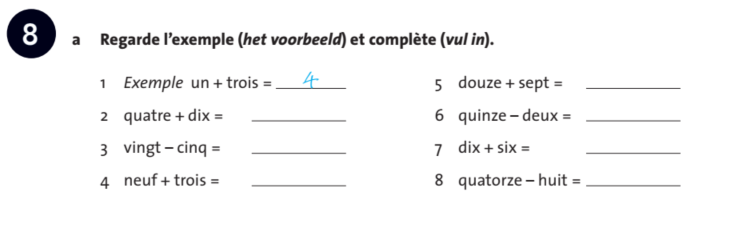
<assessment assessmentType="practice">
  <title number="8" label"assessment">8</title>

  <p fontStyles="bold">
    a Regarde l’exemple (<em type="italic">het voorbeeld</em>) et complète
    (<em type="italic">vul in</em>).
  </p>

  <list listType="ordered" numberType="decimal">
    <li>
      <em type="italic">Exemple</em> un + trois =
      <input type="text" id="input-1" prefilled="4"/>
    </li>
    <li>
      quatre + dix =
      <input type="text" id="input-2"/>
    </li>
    <li>
      vingt – cinq =
      <input type="text" id="input-3"/>
    </li>
    <li>
      neuf + trois =
      <input type="text" id="input-4"/>
    </li>
    <li>
      quatre + dix =
      <input type="text" id="input-5"/>
    </li>
    <li>
      quinze – deux =
      <input type="text" id="input-6"/>
    </li>
    <li>
      dix + six =
      <input type="text" id="input-7"/>
    </li>
    <li>
      quatorze – huit =
      <input type="text" id="input-8"/>
    </li>
  </list>
</assessment>
Checkbox
Process as <input type="checkbox"> for each circle.
  <indicators>
    <img alt="regarder" role="informative" src="/img/000000_regarder.jpg" type="pictogram"/>
  </indicators>
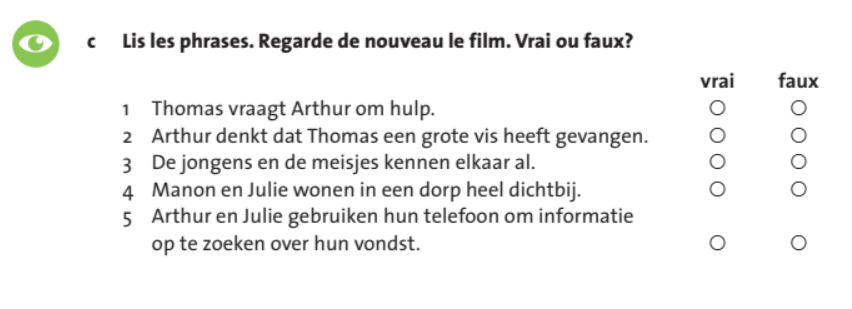
  <p fontStyles="bold">c  Lis les phrases. Regarde de nouveau le film. Vrai ou faux?</p>
  <table>
    <thead>
      <tr>
        <th/>
        <th>vrai</th>
        <th>faux</th>
      </tr>
    </thead>
    <tbody>
      <tr>
        <td>1 Thomas vraagt Arthur om hulp.</td>
        <td><input type="checkbox" id="input-1"/></td>
        <td><input type="checkbox" id="input-2"/></td>
      </tr>
      <tr>
        <td>2 Arthur denkt dat Thomas een grote vis heeft gevangen.</td>
        <td><input type="checkbox" id="input-3"/></td>
        <td><input type="checkbox" id="input-4"/></td>
      </tr>
      <tr>
        ...

    </tbody>
  </table>
Atypical input
In some assessments other forms of input are used (see below where pictograms are used instead of checkboxes). Process these by capturing the picogram and place a checkbox behind it.
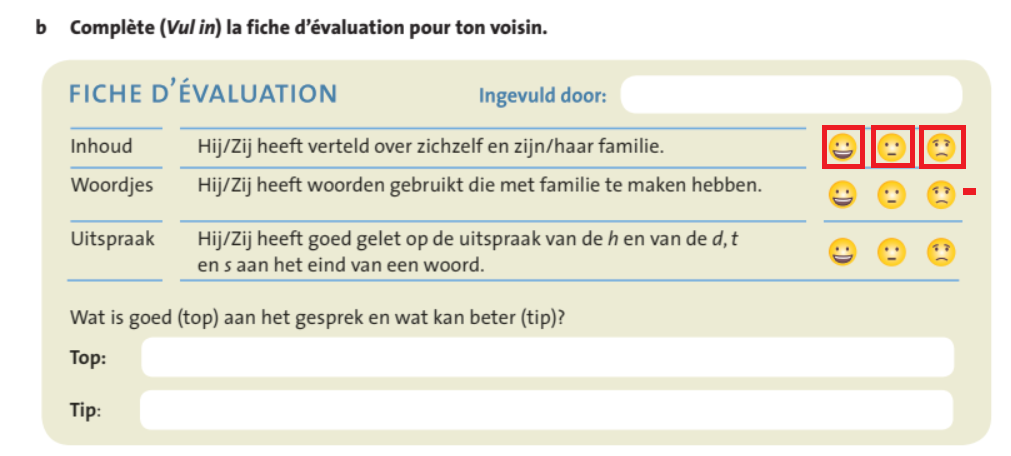
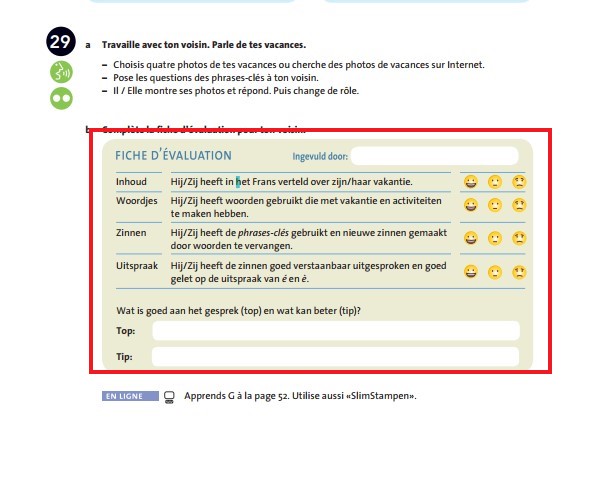
<p fontStyles="bold">b  Complète (Vul in) la fiche d’évaluation pour ton voisin.</p>
<frame backgroundColor="lightGreen">
  <title foregroudColor="lightBlue">FICHE D'ÉVALUATION</title>
  <p foregroudColor="lightBlue">Ingevuld door: <input type="text" id="input-1"/>
  <table>
    <tr>
      <td>Inhoud</td>
      <td>Hij/Zij heeft verteld over zichzelf en zijn/haar familie.</td>
      <td>
        <img alt="happy" role="informative" src="/img/happy.jpg" type="pictogram"/>
        <input type="checkbox" id="input-2"/>
        <img alt="neutral" role="informative" src="/img/neutral.jpg" type="pictogram"/>
        <input type="checkbox" id="input-3"/>
        <img alt="sad" role="informative" src="/img/sad.jpg" type="pictogram"/>
        <td><input type="checkbox" id="input-4"/>
     </td>
    </tr>
    <tr>
      ...
  </table>
  <p>Wat is goed (top) aan het gesprek en wat kan beter (tip)?
  <p><span fontStyle="bold">Top: </span>    <input type="text" id="input-5"/></p>
  <p><span fontStyle="bold">Tip: </span>    <input type="text" id="input-6"/></p>
</frame>
Figures/Images
Puzzles
Process puzzles as <figure>.
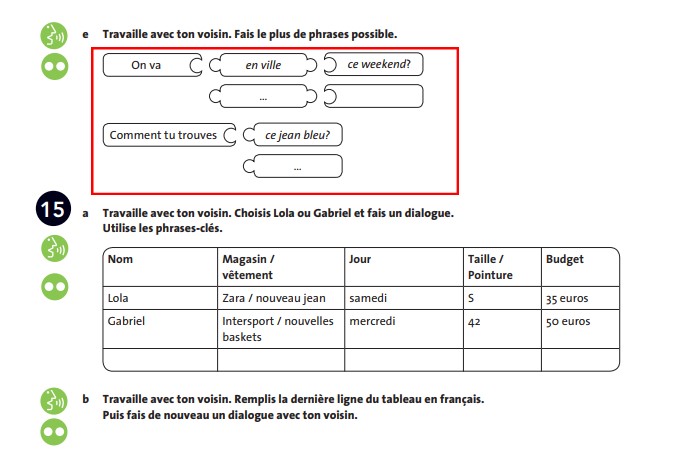
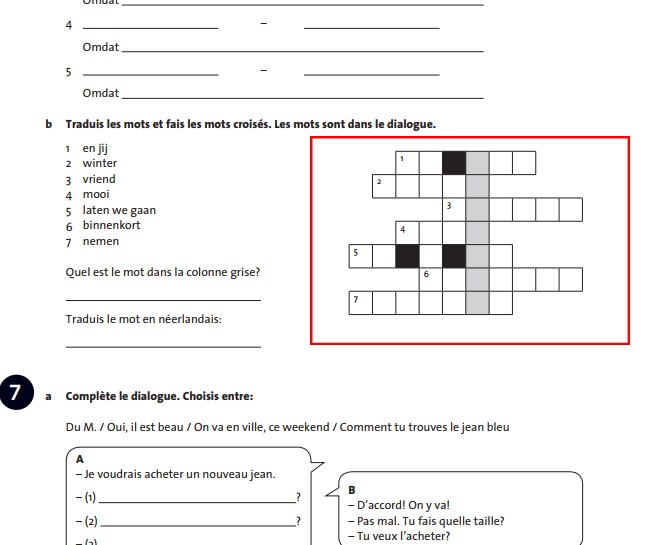
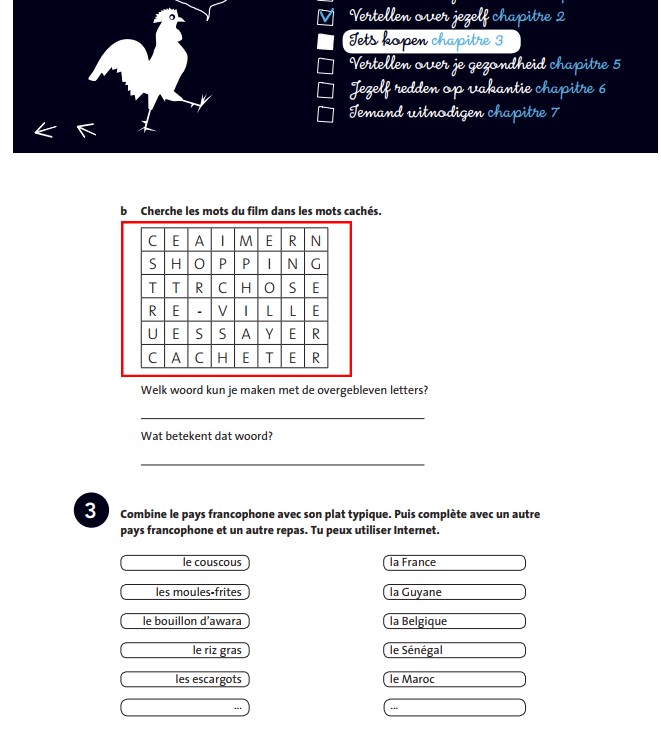
Frames
Process these as <frame>.
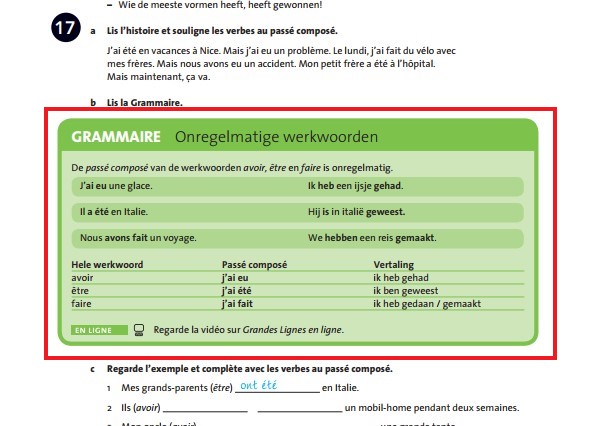
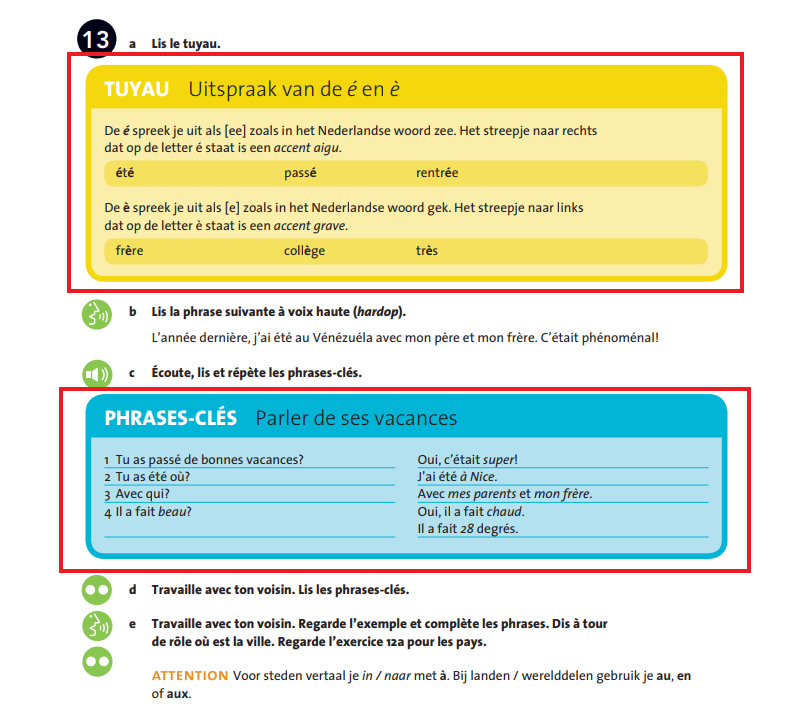
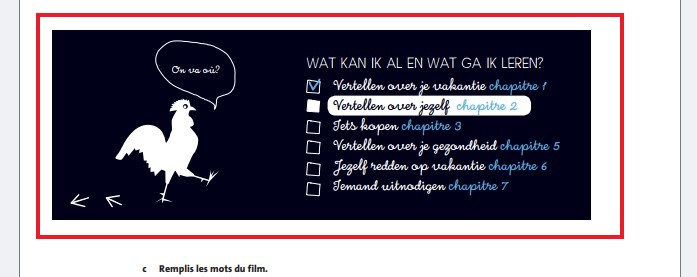
- For the example below and similair, use <title> for the text in the red box and <subtitle> for the text in the blue box.