Documentation
Elements
- <a>
- <altRepresentation>
- <aside>
- <assessment>
- <author>
- <backcover>
- <blockquote>
- <body>
- <bodymatter>
- <caption>
- <code>
- <cover>
- <dd>
- <dl>
- <document>
- <dt>
- <em>
- <figure>
- <figureGroup>
- <frame>
- <frontcover>
- <frontmatter>
- <hd>
- <img>
- <indicators>
- <input>
- <jacketcopy>
- <legend>
- <li>
- <line>
- <linegroup>
- <list>
- <meta>
- <metadata>
- <note>
- <noteRef>
- <p>
- <pagebreak>
- <poem>
- <publication>
- <pullquote>
- <rearmatter>
- <section>
- <source>
- <span>
- <sub>
- <subtitle>
- <sup>
- <table>
- <tbody>
- <td>
- <tfoot>
- <th>
- <thead>
- <title>
- <tr>
Tables of contents
Purpose
This document describes how a table of contents must be marked up in MONET v2. The goal is that the number, title, and page reference of each TOC item are individually addressable, so that downstream systems (rendering, accessibility, navigation) can process the TOC reliably.
These guidelines are mandatory. Alternative constructions are not permitted, even when they produce the same visual result.
Base structure
The table of contents is marked up as a nested <list> with the following fixed properties:
role="toc"listType="ordered"numberType="predefined"
The top level of the list contains the chapters. Subchapters are a nested <list> inside the parent <li>. Further levels (sections under subchapters, etc.) follow the same pattern.
List items
Number
The chapter or section number is always placed in the @number attribute of the <li>. The number must not be included inline in the text content of the <li>.
✅ Correct:
<li number="1.2">Het practicumlokaal <a href="#pb-6" type="pageRef">6</a></li><li number="3">De koeien <a href="#pb-4" type="pageRef">4</a></li>❌ Not allowed:
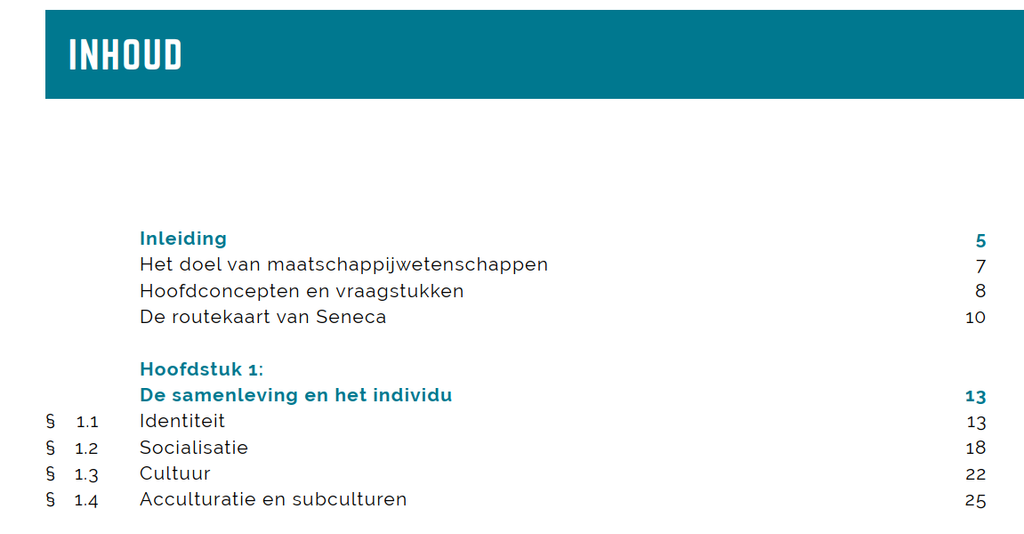
<li>1.2 Het practicumlokaal <a href="#pb-6" type="pageRef">6</a></li><li>3 De koeien <a href="#pb-4" type="pageRef">4</a></li>If the (sub)chapter number is preceded by a paragraph symbol in the table of contents, leave out the paragraph symbol.
✅ Correct:
<li number="1.1">Identiteit <a type="pageRef" href="#pb-13">13</a></li>❌ Not allowed:
<li number="§ 1.1">Identiteit <a type="pageRef" href="#pb-13">13</a></li><li number="1.1">§ Identiteit <a type="pageRef" href="#pb-13">13</a></li><li number="1.1">§ 1.1 Identiteit <a type="pageRef" href="#pb-13">13</a></li>Title
The visible title of the chapter or section is the text content of the <li>, placed before the page reference.
Page reference
Each <li> ends with a page reference marked up as an <a> element:
type="pageRef"(required)hrefpoints to the correspondingpagebreakelement in the document, for examplehref="#pb-38"- the text content of
<a>is the page number as printed in the book
Separators between the title and the page number (spaces, tabs, leader dots) are not included in the XML — these are presentation and are added by the renderer.
✅ Correct:
<li number="2.1">Licht en schaduw <a type="pageRef" href="#pb-40">40</a></li>❌ Not allowed:
<li number="2.1">Licht en schaduw .......... 40</li>Book parts
A book part (for example “deel A”, “deel 1A”) is not placed inside the TOC list itself, and is not an additional level in the nested list.
Instead, for each book part:
- a
<p>is placed containing the book part label, - followed by a separate
<list role="toc">containing the chapters of that book part.
When multiple book parts exist, this pattern is repeated.
This keeps the rule “top level of the TOC list = chapter” valid in all cases.
Examples
TOC without book parts
<list role="toc" listType="ordered" numberType="predefined">
    <li number="1">Natuur- en scheikunde doen <a type="pageRef" href="#pb-6">6</a>
        <list role="toc" listType="ordered" numberType="predefined">
            <li number="1.1">NaSk is overal <a type="pageRef" href="#pb-8">8</a></li>
            <li number="1.2">Het practicumlokaal <a type="pageRef" href="#pb-12">12</a></li>
            <li number="1.3">Grootheden, eenheden en meetinstrumenten <a type="pageRef" href="#pb-16">16</a></li>
            <li number="1.4">Onderzoeken <a type="pageRef" href="#pb-22">22</a></li>
            <li number="1.5">Ontwerpen <a type="pageRef" href="#pb-29">29</a></li>
        </list>
    </li>
    <li number="2">Licht <a type="pageRef" href="#page-38">38</a>
        <list role="toc" listType="ordered" numberType="predefined">
            <li number="2.1">Licht en schaduw <a type="pageRef" href="#pb-40">40</a></li>
            <li number="2.2">Spiegels <a type="pageRef" href="#pb-45">45</a></li>
            <li number="2.3">Lichtbundels <a type="pageRef" href="#pb-50">50</a></li>
            <li number="2.4">Gekleurd licht <a type="pageRef" href="#pb-55">55</a></li>
            <li number="2.5">Gekleurde voorwerpen <a type="pageRef" href="#pb-61">61</a></li>
        </list>
    </li>
</list>
TOC with book parts
<p>deel A</p>
<list role="toc" listType="ordered" numberType="predefined">
    <li number="1">Jagers en boeren <a type="pageRef" href="#pb-12">12</a>
        <list role="toc" listType="ordered" numberType="predefined">
            <li number="1">Jagers en verzamelaars <a type="pageRef" href="#pb-16">16</a></li>
            <li number="2">De eerste boeren <a type="pageRef" href="#pb-22">22</a></li>
            <li number="3">Egypte en de Nijl <a type="pageRef" href="#pb-28">28</a></li>
        </list>
    </li>
    <li number="2">De Grieken <a type="pageRef" href="#pb-54">54</a>
        <list role="toc" listType="ordered" numberType="predefined">
            <li number="1">Het leven in een Griekse stadstaat <a type="pageRef" href="#pb-58">58</a></li>
            <li number="2">Politiek in Athene <a type="pageRef" href="#pb-64">64</a></li>
        </list>
    </li>
</list>

<p>deel B</p>
<list role="toc" listType="ordered" numberType="predefined">
    …
</list>
Special or graphical tables of contents
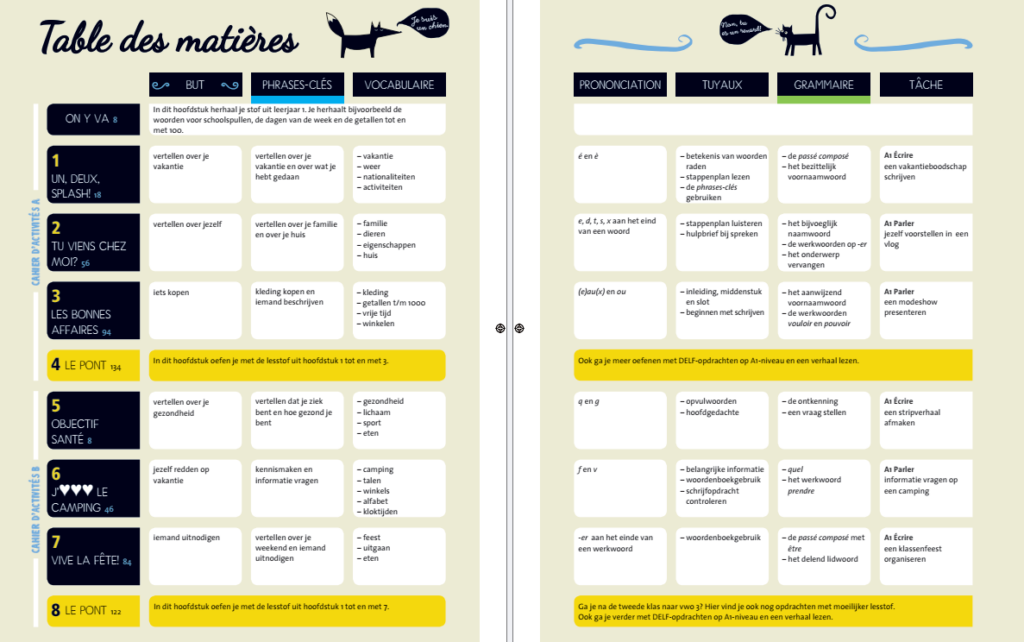
Some publications contain separate or highly graphical table of contents pages in which actual TOC entries are combined with additional educational, thematic, or instructional content.
In these cases, producers should distinguish between:
- actual TOC items intended for navigation;
- supplementary content that supports the layout or educational purpose of the page.
TOC extraction
Only genuine table of contents entries should be included in the navigation structure and TOC markup. These typically include:
- chapter titles;
- section titles;
- corresponding page numbers.
Supplementary content should not be included as TOC items. This may include, for example:
- learning goals;
- vocabulary lists;
- grammar topics;
- pronunciation guidance;
- assignments or tasks;
- instructional or descriptive text;
- visual labels or thematic groupings.
The goal is to preserve a clear and usable navigation structure while avoiding unnecessary clutter in the TOC.
Alternative representation
Because these types of pages often have an important visual, thematic, or educational function, the complete page may additionally be included as an alternative representation.
In such cases:
- capture the full page as an image;
- provide an XML representation inside
<altRepresentation>; - use a table structure where appropriate to preserve the visual grouping and relationships between content blocks.
The alternative representation is supplementary and does not replace the regular TOC structure.
If you follow this instruction the code for the above example ( would be something like this:
<section level="1" role="toc">
<hd level="1">Table des matières</hd>
<p>Cahier d'activités A</p>
<list role="toc" listType="ordered" numberType="predefined">
    <li>ON Y VA <a type="pageRef" href="#pb-8">8</a></li>
    <li number="1">UN, DEUX, SPLASH! <a type="pageRef" href="#pb-18">18</a></li>
    <li number="2">TU VIENS CHEZ MOI? <a type="pageRef" href="#pb-56">56</a></li>
    <li number="3">LES BONNES AFFAIRES <a type="pageRef" href="#pb-94">94</a></li>
    <li number="4">LE PONT <a type="pageRef" href="#pb-134">134</a></li>
</list>
<p>Cahier d'activités B</p>
<list>
    <li number="5">OBJECTIF SANTÉ <a type="pageRef" href="#pb-8">8</a></li>
    <li number="6">J♥♥♥ LE CAMPING <a type="pageRef" href="#pb-46">46</a></li>
    <li number="7">VIVE LA FÊTE! <a type="pageRef" href="#pb-84">84</a></li>
    <li number="8">LE PONT <a type="pageRef" href="#pb-122">122</a></li>
</list>

<figure>
    <img src="/img/374319_p000-toc.jpg" role="informative" type="screenshot" alt="">
        <altRepresentation>
            <table>
                <thead>
                    <tr>
                        <th>Chapitre</th>
                        <th>BUT</th>
                        <th>PHRASES-CLÉS</th>
                        <th>VOCABULAIRE</th>
                        <th>PRONONCIATION</th>
                        <th>TUYAUX</th>
                        <th>GRAMMAIRE</th>
                        <th>TÂCHE</th>
                    </tr>
                </thead>
                <tbody>
                    <tr>
                        <td>ON Y VA <a type="pageRef" href="#pb-8">8</a></td>
                        <td colspan="3">In dit hoofdstuk herhaal je stof uit leerjaar 1. Je herhaalt bijvoorbeeld de woorden voor schoolspullen, de dagen van de week en de getallen tot en met 100.</td>
                    </tr>
                    <tr>
                        <td>1 UN, DEUX, SPLASH! <a type="pageRef" href="#pb-18">18</a></td>
                        <td>vertellen over je vakantie</td>
                        <td>vertellen over je vakantie en over wat je hebt gedaan</td>
                        <td>
                            <list listType="unordered" bulletType="dash">
                                <li>vakantie</li>
                                <li>weer</li>
                                <li>nationaliteiten</li>
                                <li>activiteiten</li>
                            </list>
                        </td>
                        <td><em fontStyles="italic">é</em> en <em fontStyles="italic">è</em></td>
                        <td>
                            <list listType="unordered" bulletType="dash">
                                <li>betekenis van woorden raden</li>
                                <li>stappenplan lezen</li>
                                <li>de <em fontStyles="italic">phrases-clés</em> gebruiken</li>
                            </list>
                        </td>
                        <td>
                            <list listType="unordered" bulletType="dash">
                                <li>de <em fontStyles="italic">passé composé</em></li>
                                <li>het bezittelijk voornaamwoord</li>
                            </list>
                        </td>
                        <td>À Écrire: een vakantieboodschap schrijven</td>
                    </tr>
                    ...
                </tbody>
            </table>
        </altRepresentation>
    </img>
</figure>
</section>
General principle
When working with complex or educational TOC pages, producers should focus the actual TOC on navigational content only, while preserving the richer visual structure separately through an alternative representation.