Documentation
Elements
- <a>
- <altRepresentation>
- <aside>
- <assessment>
- <author>
- <backcover>
- <blockquote>
- <body>
- <bodymatter>
- <caption>
- <code>
- <cover>
- <dd>
- <dl>
- <document>
- <dt>
- <em>
- <figure>
- <figureGroup>
- <frame>
- <frontcover>
- <frontmatter>
- <hd>
- <img>
- <indicators>
- <input>
- <jacketcopy>
- <legend>
- <li>
- <line>
- <linegroup>
- <list>
- <meta>
- <metadata>
- <note>
- <noteRef>
- <p>
- <pagebreak>
- <poem>
- <publication>
- <pullquote>
- <rearmatter>
- <section>
- <source>
- <span>
- <sub>
- <subtitle>
- <sup>
- <table>
- <tbody>
- <td>
- <tfoot>
- <th>
- <thead>
- <title>
- <tr>
De Geo
Book structure
Use the table of contents to determine the sectioning structure. See Sectioning for more information. For headings that are not mentioned in the table of contents, use hd without the level attribute.
Table of contents
This series contains a special table of contents. Only process real toc entries as the list items of the list role="toc". In addition, capture the complete table of contents as a figure with an altRepresentation. Fill the altRepresentation with a table as in the print.
See Tables of contents – MONET > ‘Special or graphical tables of contents’ for an example of a graphical table of contents and the corresponding code example.
Pictograms
The pictograms that you encounter throughout the book should be processed as an image.
| pictogram | value alt attribute |
 | hoofdzaak |
 | uitleg of opsomming |
 | voorbeeld of extra uitleg |
Frames
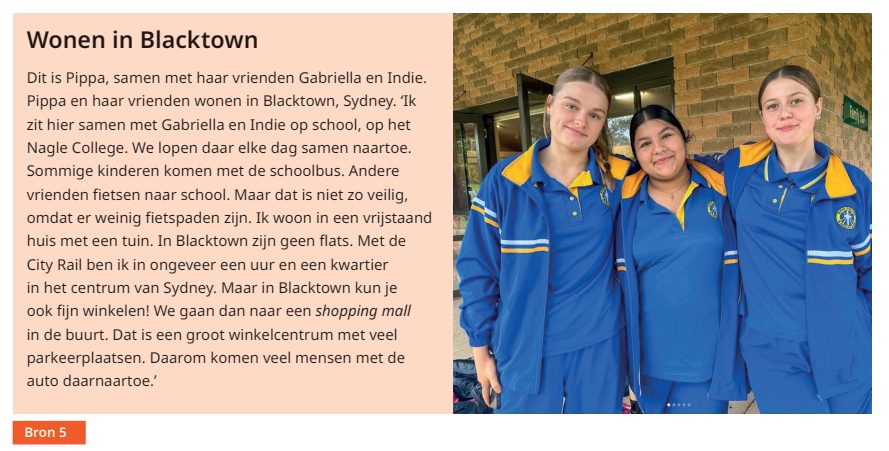
<frame>
<title>Bron 5</title>
<subtitle>Wonen in Blacktown</subtitle>
<p>Dit is Pippa, ... Daarom komen veel mensen met de auto daarnaartoe.’</p>
</frame>
Images
Use the legend element for images of maps. Do not forget to use type="map" for these type of images.
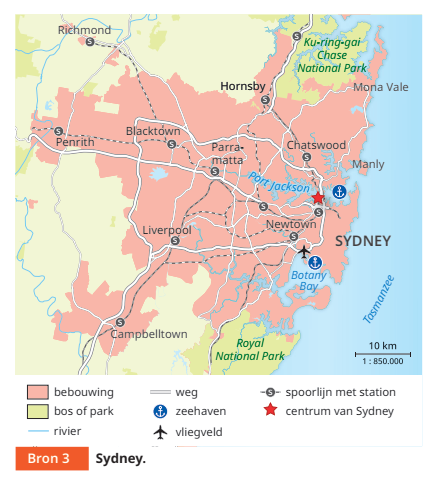
<figure>
<img alt="" role="informative" src="/img/000000_p000-0.jpg" type="map"/>
<title number="10">Bron 10</title>
<caption>Sydney.</caption>
<legend>
<list listType="unordered" bulletType="none">
<li>bebouwing</li>
<li>bos of park</li>
<li>rivier</li>
<li>weg</li>
<li>zeehaven</li>
<li>vliegveld</li>
<li>spoorlijn met station</li>
<li>centrum van Sydney</li>
</list>
</legend>
</figure>
Key words
Use the label, fontStyles and foregroundColor attribute on emphasized key words within the running text. See em.
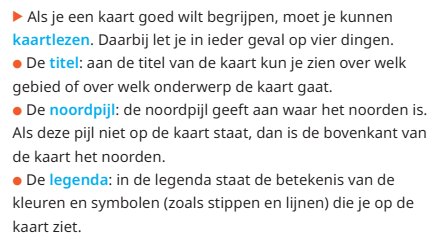
<p><img alt="hoofdzaak" role="informative" src="/img/pictogram.jpg" type="pictogram"/> Als je een kaart goed wilt begrijpen, moet je kunnen <em fontStyles="bold" foregroundColor="blue" label="definition">kaartlezen</em>. Daarbij let je in ieder geval op vier dingen.</p>
<p><img alt="uitleg of opsomming" role="informative" src="/img/pictogram.jpg" type="pictogram"/> De <em fontStyles="bold" foregroundColor="blue" label="definition">titel</em>: aan de titel van de kaart kun je zien over welk gebied of over welk onderwerp de kaart gaat.</p>
<p><img alt="uitleg of opsomming" role="informative" src="/img/pictogram.jpg" type="pictogram"/> De <em fontStyles="bold" foregroundColor="blue" label="definition">noordpijl</em>: de noordpijl geeft aan waar het noorden is. Als deze pijl niet op de kaart staat, dan is de bovenkant van de kaart het noorden.</p>
<p><img alt="uitleg of opsomming" role="informative" src="/img/pictogram.jpg" type="pictogram"/> De <em fontStyles="bold" foregroundColor="blue" label="definition">legenda</em>: in de legenda staat de betekenis van de kleuren en symbolen (zoals stippen en lijnen) die je op de kaart ziet.</p>
Definition lists
See dl.
Example: