Documentation
Elements
- <a>
- <altRepresentation>
- <aside>
- <assessment>
- <author>
- <backcover>
- <blockquote>
- <body>
- <bodymatter>
- <caption>
- <code>
- <cover>
- <dd>
- <dl>
- <document>
- <dt>
- <em>
- <figure>
- <figureGroup>
- <frame>
- <frontcover>
- <frontmatter>
- <hd>
- <img>
- <indicators>
- <input>
- <jacketcopy>
- <legend>
- <li>
- <line>
- <linegroup>
- <list>
- <meta>
- <metadata>
- <note>
- <noteRef>
- <p>
- <pagebreak>
- <poem>
- <publication>
- <pullquote>
- <rearmatter>
- <section>
- <source>
- <span>
- <sub>
- <subtitle>
- <sup>
- <table>
- <tbody>
- <td>
- <tfoot>
- <th>
- <thead>
- <title>
- <tr>
<a>
The <a> element defines a hyperlink. It links to another page within the same document, or to an external source.
Attributes
| Name | Explanation | Required |
|---|---|---|
href | Indicates the link’s destination. The | |
type | Allowed values:
|
Examples
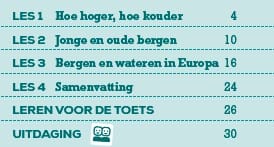
Page reference in table of contents
<frame>
  <list listType="unordered" bulletType="none" role="toc">
    <li>LES 1 Hoe hoger, hoe kouder <a href="#pb-4"  type="pageRef">4</a></li>
    <li>LES 2 Jonge en oude bergen <a href="#pb-10" type="pageRef">10</a></li>
    <li>LES 3 Bergen en wateren in Europa <a href="#pb-16" type="pageRef">16</a></li>
    <li>LES 4 Samenvatting <a href="#pb-24" type="pageRef">24</a></li>
    <li>LEREN VOOR DE TOETS <a href="#pb-26" type="pageRef">26</a></li>
    <li>UITDAGING <img alt="" role="informative" src="/img/Symbool4.jpg" type="pictogram"/>
        <a href="#pb-30" type="pageRef">30</a></li>
  </list>
</frame>